
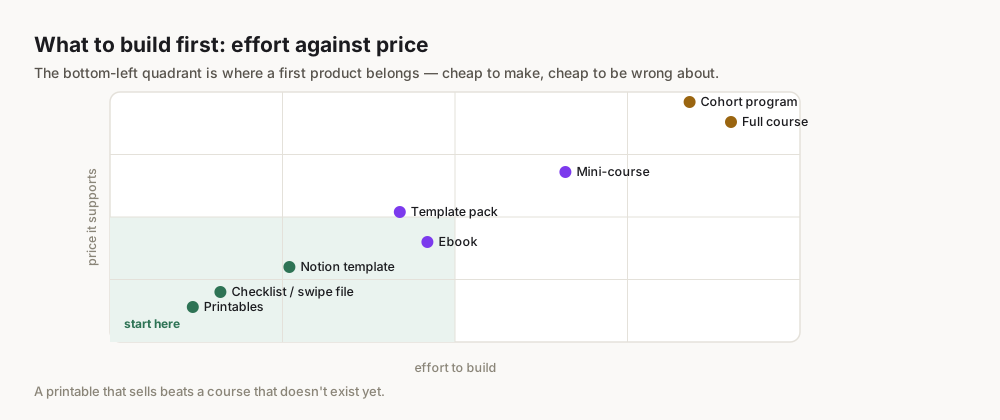
What Exactly Are Printables for Passive Income?
Defining Printables
At its core, a "printable" is a digital file that a customer purchases, downloads, and then prints themselves (or uses digitally, as is often the case with planners or journals). Think of anything you might buy in a physical store that could instead be delivered instantly to your computer:
- Planners & Organizers: Daily planners, weekly schedules, budget trackers, goal-setting worksheets.
- Digital Art & Decor: Wall art, greeting cards, invitations, nursery prints.
- Educational Materials: Worksheets for kids, lesson plans for teachers, flashcards.
- Business Templates: Invoice templates, social media planners, marketing checklists.
- Journals & Trackers: Gratitude journals, habit trackers, meal planners.
- Party & Event Supplies: Banners, cupcake toppers, gift tags.
The beauty of printables lies in their versatility and the immediate gratification they offer customers. Once you create a file, it can be sold an infinite number of times without any additional cost per unit beyond the initial creation and platform fees.
Why Printables for Passive Income?
The allure of printables for passive income is compelling for several reasons:
- Low Startup Costs: You don't need to invest in physical products, inventory, or shipping. Your primary costs are design software (many free options exist), platform fees, and potentially some marketing.
- No Inventory Management: Once created, your digital product sits on a server, ready for download. No warehouses, no stockouts, no returns to process.
- Scalability: A single printable can be sold hundreds or thousands of times. You create it once, and it continues to generate income without further active input from you.
- Global Reach: Your digital store is open 24/7 to customers worldwide.
- Creative Outlet: It allows you to monetize your creativity, whether you're a designer, an organizer, or just someone with a good idea.
- High-Profit Margins: After initial creation costs, nearly 100% of each sale is profit, minus platform fees.
Don't limit your thinking to "print-only." Many customers purchase printables for digital use with apps like GoodNotes or Notability. Clearly state if your product is optimized for digital use to broaden its appeal.
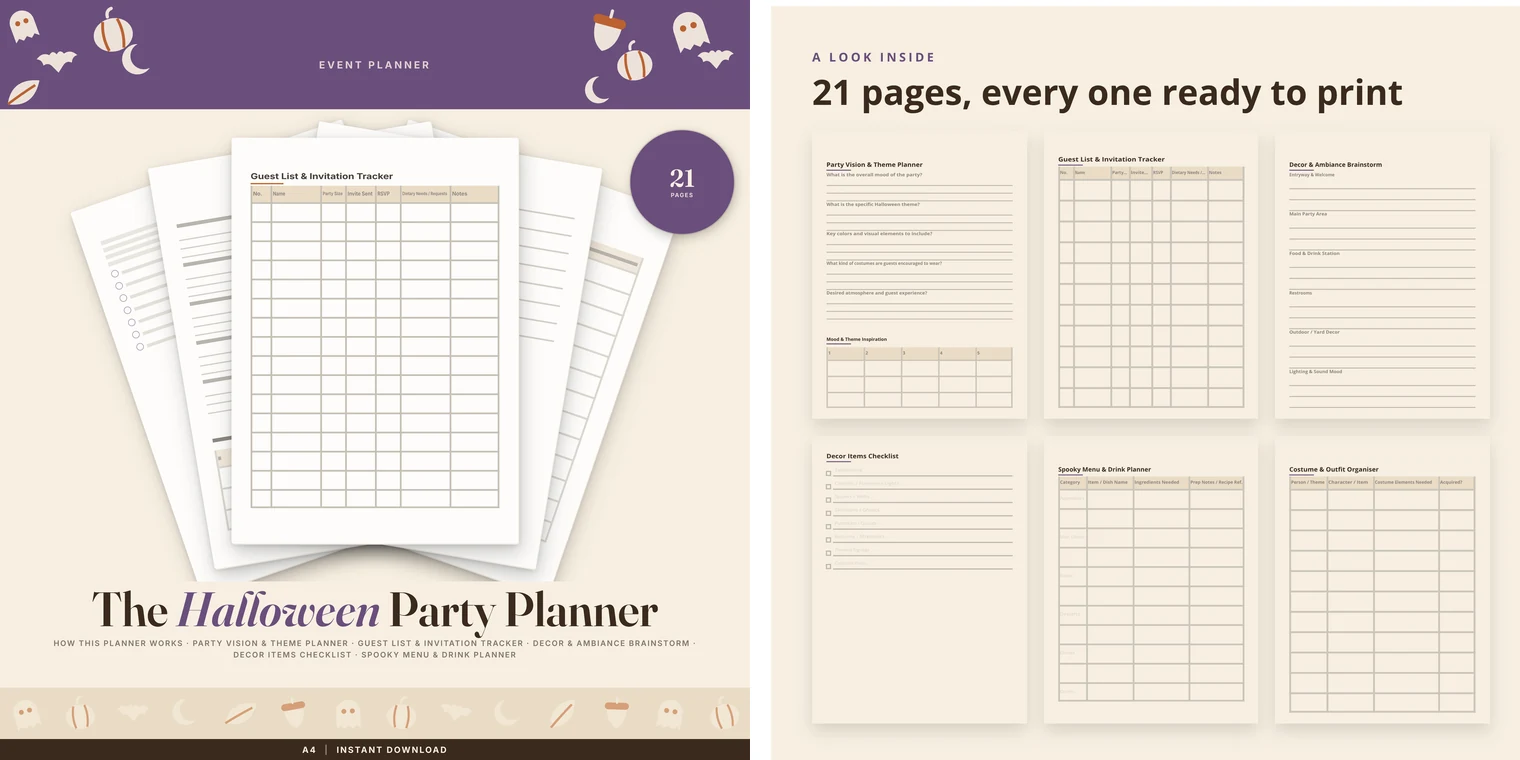
How to Find Profitable Printable Niches & Ideas
The biggest mistake beginners make is creating what they like, rather than what the market demands. Profitable printables solve a problem, fulfill a desire, or cater to a specific, identifiable audience.
Market Research Tools
Effective niche research uses data, not guesswork.
- Google Trends: Start broad. Type in "planners," "digital art," "kids activities." Look at regional interest, related queries, and how trends are moving over time. Are certain types of planners peaking during specific seasons? trends.google.com
- Etsy Search & Filters: Etsy is a goldmine for printable sellers.
- Keyword research: Type in a broad keyword (e.g., "wedding planner"). Look at the autocomplete suggestions – these are popular searches.
- Competitor analysis: Browse top-selling shops. What are they selling? How are their listings structured? What are their prices? Don't copy, but learn.
- Review analysis: What are customers saying they love? What are they wishing for? This reveals gaps in the market.
- Pinterest: A visual search engine that's crucial for printables. Search for "[Niche] printables" or "digital art ideas." Look at what's getting repinned and what pins link to successful products.
- Amazon (for physical counterparts): Look at best-selling physical planners, journals, or activity books. What features do they have? Can you translate that into a digital product?
- Forums & Social Media Groups: What problems are people discussing in niche Facebook groups (e.g., "bullet journal ideas," "teacher resources")? These pain points can be solved with a printable.
Brainstorming Categories
Once you have some research, start brainstorming specific ideas within broader categories.
- Productivity & Organization:
- Niche: Student academic planners, corporate project trackers, freelance invoicing templates.
- Idea Example: A minimalist weekly planner with integrated habit tracking for college students.
- Home & Lifestyle:
- Niche: Meal planning for busy families, budget trackers for newlyweds, home renovation checklists.
- Idea Example: A printable "capsule wardrobe" planner to help declutter closets.
- Creative & Art:
- Niche: Nursery wall art for specific themes (e.g., woodland animals), seasonal greeting cards, printable coloring pages for adults.
- Idea Example: A set of 12 inspirational quote prints with a farmhouse aesthetic.
- Events & Celebrations:
- Niche: Bridal shower games, personalized party invitations, baby announcement cards.
- Idea Example: A printable scavenger hunt game for a child's birthday party.
Validating Demand & Competition
- Demand: Are there enough people searching for this product? Google Trends and Etsy search volume are your friends here.
- Competition: Is the market oversaturated? If there are thousands of identical products, it will be harder to stand out.
- Look for "blue oceans": areas with demand but less competition. Maybe "planners for left-handed people" or "daily planners for night-shift workers."
- Can you offer a unique twist or higher quality than existing options?
Instead of competing head-on with "daily planner," consider adding a specific benefit or audience qualifier like "daily planner for busy moms with toddlers" or "daily planner for remote work productivity." Specificity often wins.
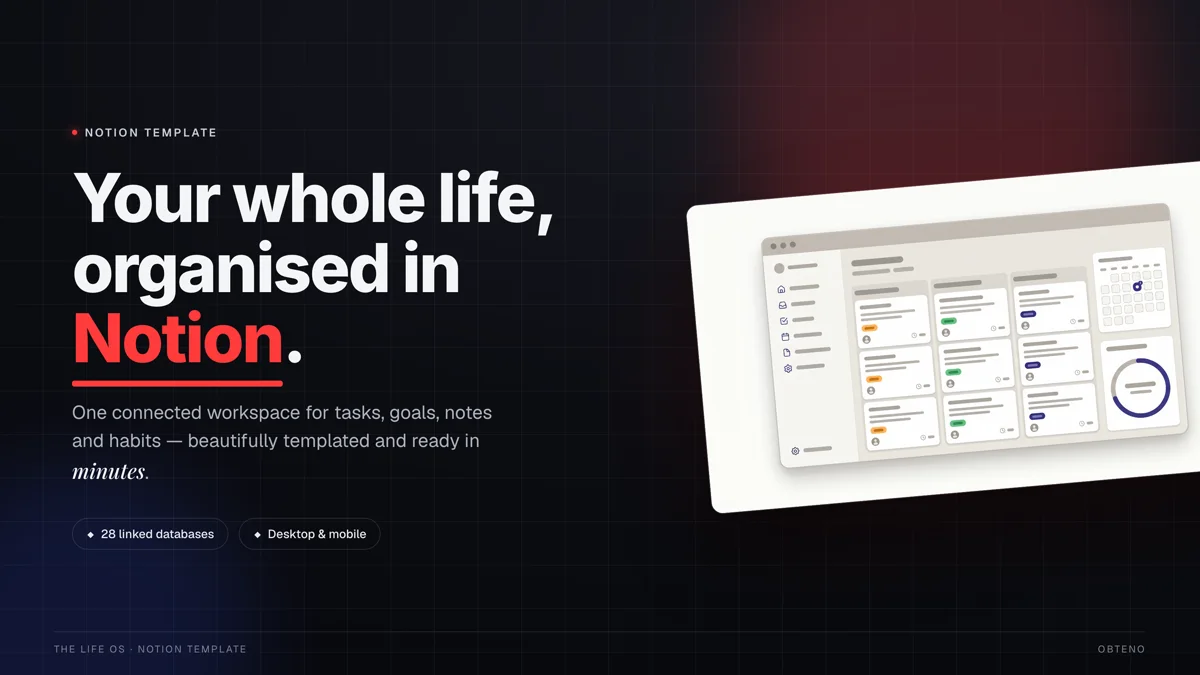
Designing Your First Printable: Tools & Best Practices
You don't need a graphic design degree to create beautiful and functional printables. The key is understanding your audience and leveraging the right tools.
Beginner-Friendly Design Software
- Canva (Recommended for Beginners): canva.com
- Pros: Extremely user-friendly drag-and-drop interface, vast library of templates, fonts, and graphics (many free). Excellent for creating visually appealing layouts quickly. You can start with a free account.
- Cons: Less control than professional software for intricate designs.
- Use Case: Ideal for almost all printables: planners, worksheets, art, invitations.
- Affinity Designer/Publisher:
- Pros: Professional-grade software at a one-time purchase price (no subscription). Offers vector graphics capabilities similar to Adobe Illustrator.
- Cons: Steeper learning curve than Canva.
- Use Case: More complex designs, scalable vector art, multi-page documents.
- Google Docs/Sheets:
- Pros: Free, accessible, great for text-heavy documents or simple trackers.
- Cons: Limited design capabilities, not suitable for highly visual printables.
- Use Case: Basic checklists, simple forms, text-based guides.
- Adobe Illustrator/InDesign (Advanced):
- Pros: Industry standard, ultimate control, professional features.
- Cons: Expensive subscription, significant learning curve.
- Use Case: If you're an experienced designer or plan to offer highly complex, custom designs.
Design Principles for Printables
- Functionality First: Before aesthetics, ensure your printable serves its purpose effectively. A planner must be easy to write in, a worksheet must have clear instructions.
- Readability: Use clear, legible fonts. Avoid overly decorative fonts for body text. Ensure sufficient contrast between text and background.
- Aesthetics:
- Consistency: Maintain a consistent style, color palette, and font usage across your entire product.
- White Space: Don't overcrowd your pages. Ample white space makes a design feel clean and professional.
- Color Psychology: Consider the mood you want to evoke. Blues and greens for calm, yellows for energy, etc.
- User Experience (UX):
- Logical Flow: Is the information presented in an intuitive order?
- Print-Friendly: Design with printing in mind. Avoid designs that bleed off the page unless specifically intended. Use standard paper sizes (US Letter, A4).
- Editability (Optional): If you offer editable templates, ensure they are truly easy for customers to customize.
File Formats & Quality
The standard file format for printables is PDF.
- High Resolution: Always export your PDFs at a high resolution (300 DPI - dots per inch is standard for print) to ensure crisp, clear prints. Canva's "Print PDF" option usually does this automatically.
- Vector vs. Raster (Briefly):
- Vector graphics (like those created in Affinity Designer or Illustrator) are mathematically defined and can be scaled to any size without losing quality. Ideal for logos, icons, and illustrations.
- Raster graphics (like photos) are made of pixels and can become blurry or pixelated when enlarged too much.
- File Size: Keep file sizes reasonable for easy downloading, but don't compromise on quality. Most modern platforms handle larger files well.
- Compression: If you're selling a bundle of printables, consider zipping them into a single .ZIP file for easier download.
Building your first product as you read this? Obteno's free course walks you through every step — completely free, no card needed.
Where Should You Sell Your Printables? Marketplaces vs. Your Own Store
Choosing the right platform is critical for reaching customers and managing your business efficiently. Each option has its pros and cons.
Etsy: The Giant for Printables
Etsy is the undisputed leader for handmade and digital products.
- Pros:
- Massive Built-in Audience: Millions of buyers actively searching for printables. You don't have to generate traffic from scratch.
- Easy Setup: Relatively simple to open a shop and list your first product.
- Trust & Familiarity: Buyers trust Etsy's platform, payment processing, and dispute resolution.
- Cons:
- High Competition: Thousands of printable sellers, making it harder to stand out without good SEO and unique offerings.
- Fees: Listing fees ($0.20 per listing, renewed every 4 months), transaction fees (6.5% of the sale price), payment processing fees (3% + $0.25 per transaction), and optional advertising fees Etsy Fees.
- Less Control: Etsy dictates shop policies, branding, and customer experience. Your shop is a page on their site, not truly "yours."
- Best for: Beginners looking to test the waters, reach a large audience quickly, and validate product ideas without building an entire website.
Gumroad: Simplicity & Control
Gumroad is a streamlined platform for creators to sell digital products directly to their audience.
- Pros:
- Simplicity: Extremely easy to set up a product page and start selling in minutes.
- Higher Control: You own the customer relationship and can brand your product pages.
- Lower Initial Fees (tiered): No listing fees. Transaction fees are tiered based on your lifetime earnings, starting at 10% for new creators, going down to 2.9% for high earners Gumroad Pricing.
- Audience Building Tools: Built-in email list management.
- Cons:
- No Built-in Audience: You are responsible for driving all traffic to your Gumroad store.
- Fewer Features: Not as robust as a full e-commerce platform like Shopify.
- Best for: Creators with an existing audience (e.g., from social media, blog), those who want more control over their brand, or anyone who wants to quickly launch and test a product.
Shopify: Scaling Your Brand
Shopify is a powerful e-commerce platform for building a fully branded online store.
- Pros:
- Complete Control & Branding: Your store, your rules. Total control over design, customer experience, and branding.
- Scalability: Robust features for managing products, orders, marketing, and analytics as your business grows.
- Apps & Integrations: Huge ecosystem of apps to extend functionality (e.g., for digital downloads, email marketing, SEO).
- Cons:
- Monthly Subscription Fees: Starts at $39/month for the basic plan, plus transaction fees if you don't use Shopify Payments Shopify Pricing.
- Requires Traffic Generation: Like Gumroad, you're responsible for driving all visitors to your store.
- Steeper Learning Curve: More complex to set up and manage than Etsy or Gumroad.
- Best for: Ambitious creators looking to build a long-term brand, those with multiple products, or businesses ready to invest in serious e-commerce infrastructure.
Platform Comparison Table
| Feature | Etsy | Gumroad | Shopify |
|---|---|---|---|
| Target Audience | Buyers actively seeking handmade/digital goods | Creators selling direct to their audience | Any e-commerce business; build your own brand |
| Ease of Setup | Very Easy | Very Easy | Moderate (requires more customization) |
| Built-in Traffic | High | None | None |
| Fees | $0.20 listing + 6.5% transaction + payment proc. | Tiered (starts 10%, lowers with earnings) | $39/month+ subscription + 0-2% transaction fees |
| Control/Branding | Limited (Etsy's platform) | Good (customizable product pages) | Excellent (full website control) |
| Scalability | Good for initial growth | Good for individual creators | Excellent for multi-product businesses |
Pricing Your Printables for Profit and Value
Pricing digital products can feel tricky because there are no physical costs to base it on. The goal is to find a sweet spot that reflects your product's value, covers your time, and is competitive in the market.
Understanding Perceived Value
- Problem Solved: How much value does your printable provide by solving a specific problem? (e.g., saving someone hours of planning, helping them achieve a goal).
- Time Saved: How much time does your product save the customer? (e.g., a pre-designed template saves them design time).
- Quality & Aesthetics: Is your design professional, unique, and visually appealing?
- Exclusivity: Is it a common item, or does it have a unique twist?
Competitive Analysis
- Benchmark: Look at similar products on your chosen platform (Etsy, Gumroad). What are top sellers charging? What about average sellers?
- Price Range: Identify the typical price range for your product type. For example, a simple daily planner might sell for $3-7, while a comprehensive wedding planner bundle could be $15-30.
- Differentiation: If your product offers significantly more value, unique features, or superior design, you can justify a higher price. If you're entering a saturated market, you might need to price slightly lower initially to gain traction.
Tiered Pricing Strategies
Consider offering different versions of your printable at various price points to appeal to a broader audience.
- Basic Version: A single, core printable at an entry-level price. (e.g., a daily planner page for $3)
- Standard Bundle: The basic printable plus complementary items (e.g., daily planner + weekly planner + habit tracker for $8).
- Premium Bundle: Everything in the standard bundle, plus bonus items, different color variations, or an editable version (e.g., the complete productivity suite for $15).
- Subscription (on your own site): For ongoing content (e.g., new weekly planners every month).
Remember, you can always adjust your prices. Start with a price you feel confident about, monitor sales, and be prepared to experiment.
Launching & Marketing Your Printable Business
Creating an amazing printable is only half the battle; getting it in front of the right people is the other. Even for passive income, an initial marketing push is crucial.
Crafting Compelling Listings
Your product listing is your digital storefront. Make it shine!
- High-Quality Mockups: Show, don't just tell. Use realistic mockups that demonstrate your printable in use (e.g., a planner open on a desk, wall art framed in a room). Canva offers mockup templates, or you can use specialized mockup generators.
- Keyword-Rich Title: Include your main keywords that people are searching for. Be specific. (e.g., "Printable Daily Planner PDF | Undated Productivity Planner | A4 Letter Digital Planner Template").
- Detailed Description:
- Problem/Solution: Start by addressing the customer's need.
- Features & Benefits: Clearly list what's included, file formats, sizes, and how it will benefit them.
- How to Use: Provide simple instructions for downloading and printing/using digitally.
- Terms of Use: Clearly state if it's for personal use only, and any other restrictions.
- Relevant Tags/Keywords: Use all available tag slots on platforms like Etsy. Think like a customer – what would they type into the search bar?
- Compelling Call to Action: Encourage purchase!
Leveraging Social Media (Especially Pinterest)
Pinterest is arguably the most powerful social media platform for printables. It functions more like a visual search engine than a traditional social network.
- Create Visually Stunning Pins: Use attractive images of your printables.
- Use Keyword-Rich Descriptions: Pinterest SEO is vital. Include relevant keywords in your pin titles and descriptions.
- Pin Consistently: Regularly share new pins linking back to your shop.
- Create Idea Pins: These can showcase multiple ways to use a printable.
- Instagram: Share aesthetically pleasing flat lays or videos of your printables in use. Use relevant hashtags.
- TikTok: Short, engaging videos showing the creation process, how to use the printable, or transformations.
SEO Basics for Printables
Search Engine Optimization (SEO) helps your products appear higher in search results.
- Keyword Research: As discussed, use tools like Google Trends and Etsy search to find relevant keywords.
- On-Page SEO (Listing Optimization): Integrate your keywords naturally into your titles, descriptions, and tags.
- Backlinks (for your own store): If you have a Shopify store, getting other reputable websites to link to your products can boost your Google ranking.
- Internal Linking (for your own store): Link related products within your own store.
Building an Email List
This is crucial for long-term passive income. An email list gives you direct access to your audience, independent of platform algorithms.
- Offer a Freebie: Provide a high-value, small printable for free in exchange for an email address (e.g., a "mini-planner" or a single beautiful art print).
- Use a Sign-Up Form: Integrate email sign-up forms on your website (if you have one) or link to a landing page (e.g., using Notion or Canva's website builder for a simple page).
- Nurture Your List: Send valuable content, behind-the-scenes glimpses, and exclusive offers to your subscribers. This builds trust and encourages repeat purchases.
Scaling & Automating Your Passive Income Stream
Once you've made your first sales, the goal is to expand and automate as much as possible to maximize the "passive" aspect.
Expanding Your Product Line
- Bundles: Combine existing printables into themed bundles (e.g., a "Student Success Bundle" with a planner, study guide, and goal tracker).
- Variations: Offer your most popular printables in different sizes, colors, or themes (e.g., a minimalist planner in pastel, vibrant, and neutral color palettes).
- New Niches: Based on your ongoing market research, explore adjacent niches or entirely new product types.
- Templates: Instead of just selling the finished product, consider selling editable templates (if allowed by your software licenses) for a higher price point.
Outsourcing Design & Marketing
As your business grows, your time becomes more valuable. Consider delegating tasks.
- Designers: If you have a clear vision but lack the time or specific design skills, hire a freelance designer (e.g., on Upwork, Fiverr) to create new printables or variations.
- Virtual Assistants: A VA can help with listing optimization, social media scheduling, customer service inquiries, or even market research.
- Pinterest Manager: If Pinterest is a major traffic driver, a dedicated manager can create and schedule pins, optimize boards, and analyze performance.
Utilizing Automation Tools
- Email Marketing Automation: Set up welcome sequences, abandoned cart reminders, and promotional campaigns to run automatically (e.g., Mailchimp, ConvertKit).
- Social Media Schedulers: Tools like Buffer, Later, or Tailwind can automatically post your content to various social media platforms at optimal times.
- Digital Product Delivery: Platforms like Etsy, Gumroad, and Shopify (with digital download apps) automate the delivery of files immediately after purchase. This is the core automation of printables.
- Obteno for Product Management: If you're building a catalog rather than one printable, Obteno keeps the products and their listing copy in one place, so a new pack does not mean starting the whole write-up again. It does not connect to the marketplaces — you still paste the listing into Etsy or Gumroad yourself.
Frequently Asked Questions
Is it really possible to make passive income with printables?
Yes, it is genuinely possible. While there's an initial active phase of creation, setup, and marketing, once your printables are live and optimized, they can generate sales 24/7 without requiring continuous active input.
How much money can I make selling printables?
Earnings vary widely based on niche, quality, marketing effort, and platform choice. Be sceptical of any specific figure quoted for this, including one you read in an article: the people who post printable-income screenshots are a self-selecting minority and nobody publishes the median. It's not a get-rich-quick scheme, but a scalable business model.
Do I need design skills to create printables?
Not necessarily. Beginner-friendly tools like Canva offer intuitive drag-and-drop interfaces and thousands of templates, allowing anyone to create professional-looking printables without advanced graphic design expertise.
What are the best printables to sell for beginners?
Simple, high-demand printables often do well for beginners, such as daily/weekly planners, habit trackers, budget templates, simple wall art with quotes, or basic educational worksheets. Focus on solving a clear problem for a specific niche.
How do I protect my printable designs from being copied?
While perfect protection is impossible, you can deter copying by adding a small, discreet watermark to your listing images, including clear terms of use (e.g., "personal use only") in your product description, and registering copyrights for unique designs if they represent significant original work.
What are the ongoing costs of selling printables?
Ongoing costs typically include platform fees (e.g., Etsy listing fees, transaction fees, Gumroad's percentage, Shopify's monthly subscription), design software subscriptions (if using premium versions), and optional marketing/advertising expenses.