
Why Notion Templates?
The digital product market is booming. While precise figures for Notion templates specifically are hard to isolate, the broader market for digital courses, ebooks and templates is large. Notion's unique appeal lies in its versatility. It's used by students, freelancers, startups, and large enterprises alike for everything from project management to personal habit tracking.
This widespread adoption means a massive, diverse audience constantly looking for ways to streamline their lives and work. The problem? Most users don't have the time or expertise to build complex, aesthetically pleasing, and highly functional Notion setups from scratch. They need plug-and-play solutions.
Your opportunity is to bridge that gap. You don't need to be a Notion certified consultant. You need to identify a common pain point, create a well-designed template that solves it, and present it clearly to the right audience. The beauty of Notion templates is their low overhead: create once, sell infinitely. This is what makes them an ideal candidate for passive income, freeing you from the constant grind of client work or physical product logistics.
What Makes a Notion Template "Sellable"?
Not all Notion templates are created equal. To command a price and generate sales, your template needs to offer more than just basic functionality. It needs to provide a clear, tangible benefit to the user.
1. Solves a Specific Problem for a Niche Audience
The biggest mistake beginners make is creating generic templates. "A to-do list template" won't sell because Notion already has one. "A to-do list for freelance writers managing multiple client deadlines and content calendars" is far more compelling.
Think about:
- Who is this for? (Freelancers, students, small business owners, specific professionals like designers or marketers)
- What problem does it solve? (Time management, project organization, content creation, habit tracking, financial planning, research management)
- What transformation does it offer? (Less stress, more productivity, clarity, better financial control)
2. Clarity & Ease of Use
A beautiful template is useless if it's confusing. Your template should be intuitive, even for Notion novices.
- Logical Structure: Information should flow naturally.
- Clear Instructions: Include a "Read Me" page or a short video walkthrough explaining how to use, customize, and duplicate the template.
- Minimalist Design: Avoid clutter. Focus on essential elements that serve a purpose.
3. Aesthetic Appeal & Thoughtful Design
While functionality is paramount, aesthetics play a huge role in perceived value.
- Consistent Branding: Use a cohesive color palette, icons, and typography.
- Visual Hierarchy: Use headings, dividers, and callouts to guide the user's eye.
- Custom Icons & Covers: These add personality and professionalism. You can find free icons on platforms like Flaticon or use tools like Canva for custom graphics.
4. Robust Functionality (Beyond Basic)
A sellable template leverages Notion's powerful features to create a superior solution.
- Databases: Utilize linked databases, relations, rollups, and formulas for dynamic organization and automation.
- Templates within Templates: Allow users to quickly create new entries (e.g., a "New Project" template within a project management system).
- Automations (if relevant): Though Notion's native automations are growing, you can suggest integrations with tools like Zapier for advanced users.
5. Comprehensive Documentation & Support
Your template isn't just the Notion page; it's the entire package.
- Walkthrough Guide: A PDF or dedicated Notion page explaining setup, customization, and best practices.
- FAQs: Address common questions users might have.
- Contact Information: Make it easy for users to reach you for support.
Don't just list features; articulate the benefit of each feature. Instead of "Includes a database for tasks," say "Manages all your client tasks in one place, automatically prioritizing deadlines so you never miss a submission."
How Do I Find Winning Notion Template Ideas?
This is where the rubber meets the road. Instead of guessing, use these strategies to identify high-demand, low-competition niches.
1. Solve Your Own Problems
What Notion templates would you pay for? What aspects of your life or work could be streamlined with a better system? Your personal frustrations are often universal.
- Personal Finance: Budgeting, investment tracking, debt repayment.
- Productivity: Habit trackers, goal setting, daily planners.
- Creative Work: Content calendars, scriptwriting templates, portfolio showcases.
2. Browse Existing Marketplaces & Communities
See what's already selling well, and identify gaps.
- Notion Template Galleries: Explore official and unofficial galleries. Note what's popular and what's missing.
- Gumroad, Etsy, Product Hunt: Filter by "Notion templates" and observe popular products, pricing, and customer reviews. What are people asking for in the comments?
- Reddit & Facebook Groups: Join Notion-focused communities. People often post questions like "How do I organize X in Notion?" or "Does anyone have a template for Y?" These are goldmines for ideas.
3. Leverage Trend Analysis
Use tools to see what topics are gaining traction.
- Google Trends: Search for "Notion for X" or "X template Notion" to see search interest over time. Look for upward trends.
- AnswerThePublic / Semrush: These tools can reveal specific questions people are asking around Notion and productivity, helping you refine your niche.
4. Focus on Specific Personas
Instead of general productivity, think about specific roles or needs.
- Students: Dissertation planners, course organizers, research databases.
- Freelancers: Client CRM, project proposals, invoice trackers.
- Small Business Owners: Marketing campaign planners, inventory management, team onboarding.
- Content Creators: YouTube video planner, podcast production pipeline, social media scheduler.
Idea Validation Checklist
Before you commit to building, run your idea through these questions:
- Is there a clear target audience? (e.g., "solopreneurs managing multiple side projects")
- Does it solve a painful problem for them? (e.g., "feeling overwhelmed by project scattered across different tools")
- Is the problem common enough to generate sales?
- Can Notion genuinely solve this problem better than existing free solutions?
- Are there similar templates selling, indicating demand? (Or is it an untapped niche?)
- Can I add a unique twist or superior design/functionality?
Building Your First Notion Template (Even If You're Not a "Designer")
You don't need a design degree to create a beautiful, functional Notion template. What you need is an understanding of Notion's capabilities and an eye for user experience.
Step 1: Outline the Core Functionality
Before touching Notion, sketch out the user's journey.
- What's the main goal? (e.g., manage projects from ideation to completion)
- What information needs to be captured? (e.g., project name, status, deadlines, tasks, resources, clients)
- How will this information be organized? (e.g., a master project database, linked task database, client database)
- What views are necessary? (e.g., Kanban board for tasks, calendar view for deadlines, gallery view for projects)
Step 2: Build with Simplicity First
Start with the basics in Notion. Create your databases, link them, and add essential properties.
- Master Databases: Often, you'll have a few core databases (e.g., Projects, Tasks, Resources, Clients).
- Relations: Link these databases so information flows seamlessly (e.g., a task is related to a project, a project is related to a client).
- Templates: Create database templates for recurring entries (e.g., a "New Project" template with pre-filled tasks or sections).
Step 3: Enhance Functionality
Now, add the "power-user" features.
- Formulas: Automate calculations (e.g., progress tracking, days until deadline).
- Rollups: Aggregate information from linked databases (e.g., show all tasks for a project on the project page).
- Synced Blocks: For recurring information like a dashboard navigation or "Read Me" sections.
- Callouts & Buttons: Guide users and automate actions.
Step 4: Design for Delight & Clarity
This is where you make it visually appealing and easy to navigate.
- Consistent Color Palette: Choose 2-3 main colors. Use Notion's built-in text colors, backgrounds, and highlights.
- Icons & Covers: Add custom icons to pages and database entries. Use cover images for major sections.
- Layout: Use columns, toggles, and dividers to break up text and create visual breathing room.
- Typography: Stick to Notion's default fonts but use different heading sizes and bolding for emphasis.
Step 5: Create a Comprehensive "How-To" Guide
This is crucial for user adoption and reducing support requests.
- Onboarding Page: A dedicated page within your template that explains how to duplicate it, how to get started, and an overview of its features.
- Video Walkthrough (Optional but Recommended): A short screen-recorded video showing how to use the template can significantly increase perceived value and ease of use.
- Customization Tips: Show users how they can adapt the template to their specific needs.
When designing, imagine you're teaching a complete Notion beginner. Over-explain rather than under-explain. Use screenshots within your guide to illustrate steps.
How Do You Price Notion Templates for Profit?
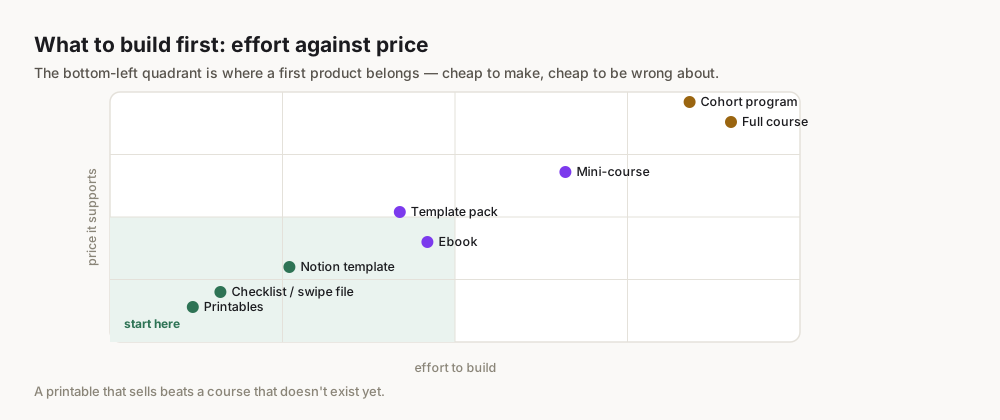
Pricing can be tricky, but it's not arbitrary. It's a blend of perceived value, market demand, and your target profit margin.
1. Value-Based Pricing
Instead of thinking about the hours you put in, think about the value your template provides.
- Time Saved: How many hours will your template save the user each week/month?
- Problem Solved: How significant is the problem it solves? (e.g., avoiding missed deadlines, achieving a major life goal).
- Opportunity Gained: What new opportunities does it unlock? (e.g., better client management leading to more projects).
If your template saves a freelancer 5 hours a week, and their hourly rate is $50, that's $250 in value per week. A template priced at $39 or $59 suddenly seems like a bargain.
2. Competitor Analysis
Research what similar Notion templates are selling for on platforms like Gumroad, Etsy, and dedicated Notion template stores.
- Identify Price Ranges: Are most basic templates in the $10-25 range? More complex ones $30-70?
- Feature Comparison: How does your template compare in terms of features, design, and accompanying guides? If yours is superior, you can justify a higher price.
- Niche Specificity: Highly niche, specialized templates can often command higher prices because they solve a very specific, acute problem for a smaller, more dedicated audience.
3. Tiered Pricing Strategy
Offer different versions of your template at various price points to cater to different budgets and needs.
- Basic Version: The core template with essential functionality. (e.g., $19)
- Pro Version: Basic + advanced features, more complex databases, additional views, or a more in-depth guide. (e.g., $39)
- Premium Bundle: Pro + one-on-one setup call, custom icon pack, or a complementary template. (e.g., $79)
This strategy helps you capture a wider range of customers and increases your average order value.
4. Psychological Pricing
Use pricing tactics that make your product more appealing.
- Ending in .99 or .95: (e.g., $29.99 instead of $30).
- Anchoring: Present your highest-priced tier first to make the others seem more affordable.
- Scarcity/Urgency (use sparingly and honestly): Limited-time discounts for launches.
Example Pricing Structure
| Template Version | Features | Price | Target Audience |
|---|---|---|---|
| Basic | Core template, basic instructions | $19 | Budget-conscious, Notion beginners |
| Pro | Basic + advanced databases, custom icons, PDF guide | $39 | Serious users, those wanting full functionality |
| Ultimate | Pro + video walkthrough, 1-hour support call, bonus template | $79 | Power users, small teams, those needing hand-holding |
Launching and Marketing Your Notion Templates
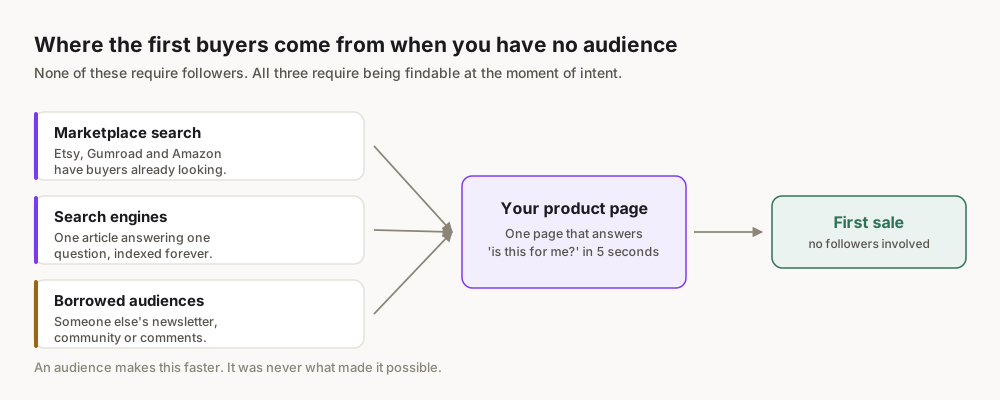
Building a great template is only half the battle. Getting it into the hands of your target audience requires a strategic launch and consistent marketing.
1. Craft Compelling Sales Copy
Your product description is your digital salesperson.
- Headline: Grab attention and state the core benefit (e.g., "Stop Drowning in Client Work: The Ultimate Freelancer OS for Notion").
- Problem-Solution: Clearly articulate the pain point and how your template solves it.
- Benefits, Not Features: Translate every feature into a benefit (e.g., "Automated progress tracking means you always know where you stand, reducing stress and increasing client trust").
- Social Proof: If you have beta testers, include testimonials.
- Call to Action: Make it clear what you want them to do (e.g., "Get the template now" or "Learn more").
2. Create Stunning Product Visuals
People buy with their eyes.
- High-Quality Screenshots: Show off every key section of your template. Use Notion's "light" and "dark" modes if applicable.
- Mockups: Place your template screenshots into device mockups (laptops, phones) to make them look professional.
- Explainer Video: A short (1-2 minute) video walkthrough is incredibly effective for showcasing functionality and design.
3. Leverage Social Media
Meet your audience where they are.
- Twitter/X: Share screenshots, short clips, and behind-the-scenes glimpses. Engage with Notion creators and communities.
- Instagram/TikTok: Visually driven platforms are perfect for showcasing Notion templates. Create Reels or short videos demonstrating features.
- LinkedIn: If your template is business-focused, share it with relevant professional networks.
- Pinterest: Create visually appealing pins with clear headlines that link directly to your product page.
4. Content Marketing & SEO
Attract organic traffic by creating valuable content around Notion.
- Blog Posts: Write articles like "5 Ways Notion Can Improve Your Freelance Business" and subtly link to your template.
- Notion Tutorials: Create free tutorials that use elements from your template, positioning you as an expert.
- Keyword Research: Use tools like Google Keyword Planner or trends.google.com to find what people are searching for related to Notion and your niche. Optimize your product description and blog posts for these keywords.
5. Email Marketing
Build an audience before you launch.
- Lead Magnet: Offer a free mini-template or Notion guide in exchange for email sign-ups.
- Launch Sequence: Announce your upcoming template, build anticipation, and then launch to your engaged email list.
The Best Platforms to Sell Your Notion Templates
Choosing the right platform is critical for reaching your audience and managing your sales. Here's a comparison of popular options:
| Feature | Gumroad | Etsy | Dedicated Store (Shopify/WooCommerce) |
|---|---|---|---|
| Ease of Setup | Very Easy (minutes) | Easy (hours) | Moderate to Complex (days/weeks) |
| Fees | 10% + transaction fees (declining with sales) | $0.20 listing + 6.5% transaction + payment processing | ~2.9% + $0.30 per transaction + platform subscription (e.g., Shopify $29/month) |
| Audience | Digital creators, tech-savvy buyers | Craft/handmade, digital products, broad | Your own audience, requires traffic generation |
| Customization | Limited product page design | Limited store branding | Full control over design, branding, features |
| Marketing | Built-in audience features (Discover), easy sharing | Strong internal search/discovery, marketing tools | Requires external marketing efforts |
| Payment Processing | Built-in (Stripe/PayPal) | Built-in (Etsy Payments) | Integrations required (Stripe, PayPal) |
| Scalability | Good for individual products/small catalog | Good for digital goods, but can be competitive | Excellent for large catalogs, brand building |
1. Gumroad (Recommended for Beginners)
- Pros: Incredibly easy to set up. Low friction for buyers. Built-in audience features (Discover). Flexible pricing options.
- Cons: Higher transaction fees for low sales volume (though they decrease as you sell more). Limited branding customization.
- Best For: First-time sellers, quick launches, testing ideas, building an email list.
2. Etsy
- Pros: Massive existing audience actively searching for digital products. Strong search and discovery features. Trusted platform.
- Cons: Highly competitive. Transaction fees can add up. Strict rules for digital products. Requires more aesthetic effort for shop setup.
- Best For: Visually appealing templates, reaching a broader consumer market, leveraging existing marketplace traffic.
3. Dedicated Store (Shopify, WooCommerce)
- Pros: Complete control over branding, design, and customer experience. No transaction fees beyond payment processor. Highly scalable for multiple products.
- Cons: Requires more technical setup and ongoing maintenance. You are solely responsible for driving all traffic. Subscription costs.
- Best For: Established creators with a strong brand, large product catalog, and existing audience, looking for maximum control and scalability.
Start with Gumroad to validate your idea and build your first sales. Once you have proven demand, consider expanding to Etsy or investing in a dedicated store.
Common Mistakes & How to Avoid Them
Even with the best intentions, beginners often stumble. Here are the most common pitfalls and how to steer clear.
1. Creating Templates for Yourself, Not Your Audience
Mistake: Building a template that perfectly suits your workflow but doesn't resonate with others.
Avoid: Conduct thorough market research. Solve their problems, not just your own. Validate your ideas by asking potential users what they need.
2. Overcomplicating the Template
Mistake: Adding too many features, databases, and relations, making the template overwhelming and slow.
Avoid: Start simple. Focus on the core problem and solution. You can always add "Pro" features in future updates or higher tiers. Prioritize clarity and ease of use above all else.
3. Neglecting Documentation and Onboarding
Mistake: Assuming users will instinctively know how to use your complex template.
Avoid: Create a "Read Me" page or a dedicated video tutorial. Walk users through the duplication process, basic customization, and how to get the most out of your template. Clear instructions reduce support requests and improve user satisfaction.
4. Underpricing Your Value
Mistake: Setting prices too low because you're new or unsure of your template's worth.
Avoid: Research competitor pricing and, more importantly, understand the value your template provides. If it saves someone significant time or stress, price it accordingly. Consider tiered pricing to cater to different budgets.
5. "Build It and They Will Come" Mentality
Mistake: Expecting sales just because you've created a good template.
Avoid: Marketing is non-negotiable. Actively promote your template on social media, in relevant communities, and through content. Develop a launch strategy and consistently work on visibility.
6. Ignoring Feedback
Mistake: Dismissing negative comments or suggestions from early users.
Avoid: Embrace feedback! It's invaluable for improving your product. Respond courteously, implement suggestions where appropriate, and use testimonials to build trust.
Scaling Your Notion Template Business Beyond Your First Sale
Your first sale is a huge milestone, but it's just the beginning. To turn this into a truly sustainable income stream, you need to think about scaling.
1. Expand Your Product Line
Once you have a successful template, consider related products.
- Complementary Templates: If you sold a freelance project planner, create a client CRM or an invoice tracker.
- Bundles: Offer your existing templates as a discounted bundle.
- Niche Variations: Adapt a successful template for a slightly different niche (e.g., a "Student Planner" becomes a "Academic Researcher OS").
2. Offer Premium Services
Leverage your expertise for higher-ticket offerings.
- Customization Services: Offer to personalize your templates for clients who need specific adjustments.
- 1-on-1 Coaching/Consulting: Help clients set up their Notion workspaces or optimize their productivity using your systems.
- Workshops/Courses: Teach others how to build their own Notion templates or maximize their Notion usage.
3. Build a Community
An engaged community is a powerful asset.
- Dedicated Facebook Group or Discord Server: A place where your users can ask questions, share tips, and get support.
- Email Newsletter: Keep your audience updated on new templates, Notion tips, and special offers.
- Affiliate Program: Let others earn a commission by promoting your templates, expanding your reach.
4. Diversify Your Marketing Channels
Don't put all your eggs in one basket.
- Paid Ads: Once you have a proven seller, consider running targeted ads on platforms like Google, Facebook, or Pinterest.
- Collaborations: Partner with other Notion creators or influencers in your niche for cross-promotion.
- Guest Blogging/Podcasts: Share your expertise on other platforms to reach new audiences.
5. Automate & Delegate
As your business grows, look for ways to streamline operations.
- Email Automation: Set up automated welcome sequences, follow-ups, and customer support responses.
- Virtual Assistant: Consider hiring help for tasks like social media management, customer support, or even template updates.
By consistently delivering value, understanding your audience, and strategically expanding your offerings, your Notion template business can evolve from a single sale into a thriving, passive income engine.
Frequently Asked Questions
How much can I earn selling Notion templates?
Earnings vary widely based on template quality, niche, pricing, and marketing efforts. Obteno's founder built a $23,718 digital-product business in 60 days — that is the one figure here that comes from a receipt. Anything else you read about template income is someone else's number, usually unverified and usually the best month rather than the average. What actually moves it is whether the template solves a problem a specific person already knows they have.
Do I need design skills to create sellable templates?
No, advanced design skills are not required. A good eye for clarity, consistency, and user experience is more important. Notion's native features (colors, icons, layouts) are powerful enough. Tools like Canva can help you create custom cover images and icons without being a graphic designer. Focus on functionality first, then aesthetics.
How long does it take to create a Notion template?
The time varies greatly depending on complexity. A simple habit tracker might take a few hours, while a comprehensive "Second Brain" or business OS could take several days or even weeks. For your first template, aim for a clear, focused solution that can be built and refined within 1-3 days to get it to market faster.
What about ongoing updates and support?
For digital products like Notion templates, providing occasional updates (e.g., adding new features, improving design, fixing bugs) and basic customer support (answering usage questions) is expected. This builds trust and encourages repeat purchases. Most platforms like Gumroad allow you to easily push updates to past purchasers.
Can I offer free Notion templates?
Yes, offering free templates is an excellent strategy, especially for beginners. Free templates can serve as lead magnets to build your email list, showcase your expertise, and drive traffic to your paid products. They're also great for gathering initial feedback and building an audience before launching a paid product.
Is the Notion template market saturated?
While there are many Notion templates available, the market is constantly growing as Notion gains more users. The key is to avoid generic templates and instead focus on highly specific niches and problems. By offering unique value, superior design, or comprehensive documentation, you can always find your audience and stand out.