
Why Most Digital Products Fail (And How to Beat the Odds)
Imagine spending weeks, even months, pouring your energy into creating the perfect ebook, online course, or software template. You launch with excitement, only to hear… crickets. No sales, no sign-ups, no engagement. This isn't just a hypothetical fear; it's the harsh reality for a staggering number of new digital products. Studies show that a significant percentage of new businesses, many of which are digital-first, fail within their first few years Forbes. The primary reason? They built something nobody wanted or needed enough to pay for.
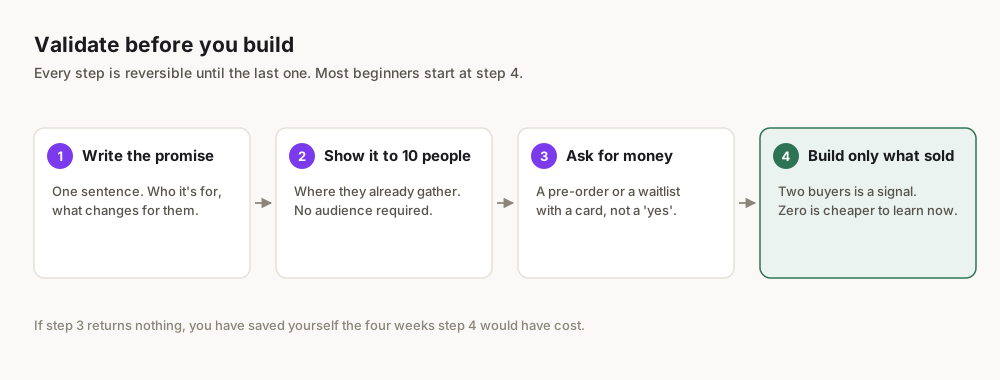
This isn't just about avoiding a financial loss; it's about safeguarding your most precious resource: your time and passion. You have an idea, and that's fantastic. But before you commit to building it, you need to validate it. As Obteno's founder, validation is the step I skipped first and paid for. This is the process I use now. This guide will give you the exact framework to ensure your digital product idea has real market demand, a hungry audience, and a clear path to profitability in 2026.
What Exactly Are You Validating? Defining Your Product & Problem
Before you dive into validation, you need a clear, albeit preliminary, understanding of what you're validating. This isn't about perfecting every feature, but about sketching the core of your idea.
The Core Components of Your Idea
Every successful digital product idea has three intertwined components you need to define, even roughly:
- The Problem: What specific pain point or unfulfilled desire does your product address? This is the most crucial element. People don't buy products; they buy solutions to their problems.
- The Solution (Your Product): How does your digital product uniquely solve that problem? Is it an ebook, a SaaS tool, a template pack, a course, or something else? What’s its core functionality or value proposition?
- The Audience: Who experiences this problem most acutely? Who would genuinely benefit from your solution? Be as specific as possible – "everyone" is not an audience.
The Problem-First Mindset
It's tempting to start with a cool product idea ("I want to build an AI-powered journaling app!"). However, a problem-first approach is far more effective. Instead, ask: "What are the common struggles people have with journaling, or with consistency, or with self-reflection? And could an AI-powered app solve that specific problem better than existing solutions?" This flips the script and immediately puts you in a user-centric mindset.
Don't fall in love with your first idea. Be prepared to pivot, refine, or even discard it if validation shows a lack of demand. Your goal is to find a problem worth solving, not to force an idea into existence.
Step 1: Start with the Problem, Not the Product
This is where the rubber meets the road. Forget your shiny product idea for a moment. Your mission is to become an expert on the problem you think you're solving.
How to Uncover Real Problems
- Personal Experience: What problems do you or people close to you face regularly? Often, the best product ideas stem from personal frustrations.
- Online Communities & Forums:
- Reddit: Search subreddits related to your niche. Look for posts where people complain, ask for solutions, or express frustrations. Read comments to gauge the intensity and prevalence of problems.
- Facebook Groups: Niche-specific groups are goldmines. Observe discussions, poll members (if allowed), and look for recurring themes.
- Quora/Stack Exchange: People explicitly ask for solutions here. Look for questions with many upvotes or answers, indicating common pain points.
- Customer Reviews of Existing Solutions:
- Amazon Reviews: Look at 1-star and 2-star reviews for competing products (physical or digital). What are people complaining about? What features are missing? What problems aren't fully solved?
- App Store Reviews: Similar to Amazon, these reveal user frustrations and unmet needs.
- Course/Ebook Reviews: If you're thinking of an educational product, see what learners found lacking in existing offerings.
- Keyword Research (Problem-Oriented): Use tools like Google Keyword Planner (free with a Google Ads account) or even just Google searches to see what problems people are actively searching for. Think "how to fix X," "best way to avoid Y," "struggling with Z."
Documenting Your Problem Hypothesis
Once you've identified a potential problem, articulate it clearly.
- Example Problem: "New freelance writers struggle to consistently find high-paying clients and spend too much time pitching for low rates."
- The Gap: "Existing resources offer general advice but lack a step-by-step, actionable system for identifying and landing specific types of high-value clients."
Step 2: Who Are You Building For? Pinpointing Your Audience
A product for everyone is a product for no one. You need to define your ideal customer with precision. This isn't just about demographics; it's about psychographics – their motivations, frustrations, and aspirations.
Creating an Audience Persona
Give your ideal customer a name. What are their:
- Demographics: Age, occupation, income level, location (if relevant).
- Psychographics:
- Goals & Aspirations: What are they trying to achieve?
- Pain Points & Frustrations: What specific problems keep them up at night? (Directly linked to Step 1).
- Values: What's important to them?
- Behaviors: Where do they hang out online? What content do they consume? What tools do they already use?
- Level of Tech-Savvy: Are they comfortable with complex software or do they need something incredibly simple?
Example Persona:
- Name: "Ambitious Anna"
- Demographics: 28-year-old freelance graphic designer, 2 years experience, lives in a medium-sized city, aiming for $60k/year.
- Pain Points: Struggles to price her services confidently, tired of low-ball clients, spends hours writing custom proposals that often get rejected, wants to attract higher-paying design work.
- Goals: Land 3-4 consistent high-paying clients, increase her hourly rate, reduce time spent on pitching, build a strong portfolio.
- Online Habits: Follows design influencers on Instagram, active in freelance designer Facebook groups, reads design blogs, uses Notion for project management.
Why This Matters
Understanding your audience helps you:
- Tailor your messaging: Speak directly to their pain points and aspirations.
- Choose the right channels: Know where to find and communicate with them.
- Develop relevant features: Build a solution that truly resonates.
Step 3: Is There Real Demand? Market Research That Matters
You have a problem and an audience. Now, prove that enough people in that audience care enough about that problem to seek a solution. This is where you move beyond assumption to data.
Tools and Techniques for Demand Validation
- Google Trends:
- How to use: Enter keywords related to your problem or solution. Look for sustained or growing interest. A flatline or decline might indicate a niche shrinking or a problem that's not widely felt.
- Example: If you're considering a "digital meal planner," search for "meal planner," "healthy eating tips," "weekly meal prep." Look at related queries and geographic interest. Google Trends
- Competitor Analysis:
- Identify Competitors: Who else is trying to solve this problem? Don't just look for direct competitors; also consider indirect ones (e.g., if you're building a productivity app, Notion templates or even physical planners are indirect competitors).
- Analyze Their Offerings: What are their price points? What features do they emphasize? What are their strengths and weaknesses (again, look at reviews!)?
- Gauge Their Success: Are they actively selling? Do they have a strong social media presence? High engagement? The existence of successful competitors often validates the market, showing there's money to be made. Your goal isn't to be first, but to be better or different.
- Marketplace Exploration:
- Etsy: Search for digital products related to your idea. Look at sales volume (if indicated), number of reviews, and pricing. This is excellent for templates, planners, printables, etc.
- Gumroad: Explore digital products in your niche. See what's selling well, how they're packaged, and their pricing strategies. Many creators share their Gumroad sales figures, providing insights into market potential.
- App Stores: For app ideas, analyze similar apps' download numbers, review counts, and revenue estimates (available through some third-party tools).
- Online Course Platforms (e.g., Udemy, Skillshare): If your product is a course, see what existing courses on your topic are popular, what their student numbers are, and what gaps exist in their content or delivery.
- Surveys & Interviews:
- Surveys (Quantitative): Use tools like Google Forms or Typeform to create short surveys. Distribute them in relevant online communities (with permission!), to your email list, or use paid survey platforms. Ask questions about the problem's severity, their current solutions, and their interest in a hypothetical solution.
- Interviews (Qualitative): Recruit 5-10 people from your target audience for 15-30 minute one-on-one interviews. Ask open-ended questions about their experiences, frustrations, and desires related to the problem. Listen much more than you talk. These insights are incredibly rich.
Interpreting Your Research
- High Demand + Low Competition (or poorly served competition): This is the sweet spot.
- High Demand + High Competition: Still viable, but you need a strong unique selling proposition (USP). How will you differentiate?
- Low Demand: Re-evaluate your problem or audience.
Step 4: Prove It Works: The Minimum Viable Product (MVP) Approach
You've identified a validated problem and audience. Now, it's time to build the absolute simplest version of your solution – your Minimum Viable Product (MVP) – to test your core hypothesis. An MVP isn't a half-baked product; it's a fully functional product with minimal features designed to deliver the core value and gather maximum validated learning with minimal effort.
What Makes a Good Digital Product MVP?
The nature of your MVP depends entirely on your product type:
- Ebook/Guide: A short, focused chapter or a detailed outline with a compelling introduction.
- Online Course: A single module, a series of 3-5 short video lessons, or even just the course outline with learning objectives.
- Templates (Notion, Canva, etc.): 1-2 essential templates that solve a specific problem, not the entire pack.
- SaaS/App: A single, core feature that provides the main benefit. For example, a task manager MVP might only allow creating and marking tasks complete, without tags, due dates, or collaboration.
How to Create Your MVP (Cost-Effectively)
The key here is speed and low cost. Don't invest heavily yet.
- No-Code Tools:
- For landing pages/pre-sales: Carrd, Leadpages, Unbounce.
- For simple web apps/internal tools: Glide, Softr, Bubble (more complex).
- For templates: Notion, Canva, Google Docs/Sheets. Obteno builds a finished ebook or template pack in one go, which is enough to put a real product in front of ten people and find out whether they want it.
- For courses: Teachable, Thinkific, Gumroad (for simple video/text courses).
- Manual Processes: Sometimes, your "product" can be a manual service. For example, if your product is a personalized meal plan generator, your MVP might be manually creating 5 meal plans for early users based on their input. This helps you understand the process and what data is truly needed before automating.
Your MVP should be just good enough to demonstrate your core value proposition. Resist the urge to add "just one more feature." That's how MVPs become bloated and lose their purpose.
Step 5: Will People Pay? Pricing & Monetization Validation
Having a great product is one thing; getting people to pay for it is another. Validation isn't complete until you confirm willingness to pay.
Strategies for Pricing Validation
- Direct Ask (Interviews/Surveys):
- In your interviews, after describing the solution, ask: "If this product existed today, what would be a fair price for it?" or "What would you expect to pay for a solution that does X, Y, and Z?"
- Use the "Van Westendorp Price Sensitivity Meter" in surveys:
- At what price would you consider this product to be so expensive that you would not consider buying it? (Too Expensive)
- At what price would you consider this product to be priced so low that you would feel the quality couldn't be very good? (Too Cheap)
- At what price would you consider this product to be a bargain—a great buy for the money? (Bargain)
- At what price would you consider this product starting to get expensive, but you still might consider buying it? (Expensive)
- Competitor Pricing Analysis:
- Research similar products or services. What are they charging? This gives you a baseline.
- Consider your unique value proposition. If you offer significantly more value or solve a problem much better, you might justify a higher price.
- Value-Based Pricing:
- Quantify the value your product provides. If your product helps a freelancer save 10 hours a month (worth $500 to them), then charging $50-$100 is a clear value exchange.
- Think about the problem's severity. People pay more for solutions to urgent, painful problems.
- Pre-Sales / Pre-Orders:
- This is the most powerful form of validation. If people are willing to pay you before the product is fully built, you have undeniable proof of demand and willingness to pay.
- Set up a simple landing page (Carrd, Gumroad) describing your product and its benefits, then offer it at an early-bird discount. Collect payments directly. If you don't hit your pre-order goal, you can refund easily and pivot. Gumroad charges a small fee per transaction Gumroad, but it's an excellent platform for this.
- Tiered Pricing (A/B Testing):
- If you have a slightly more developed MVP, you can test different price points. Offer your product at Price A to one segment and Price B to another, then analyze conversion rates.
Monetization Models
Consider how your digital product will generate revenue.
| Monetization Model | Description | Pros | Cons | Best For |
|---|---|---|---|---|
| One-Time Sale | Customer pays once for permanent access. | Simple, clear value. Predictable initial revenue. | No recurring revenue. Requires continuous new sales. | Ebooks, templates, simple courses. |
| Subscription | Recurring payments (monthly/annually) for access. | Predictable recurring revenue (MRR/ARR). Higher LTV. | Requires ongoing value/updates to retain subscribers. | SaaS, membership sites, premium content. |
| Freemium | Basic features free, premium features paid. | Low barrier to entry, large user base potential. | Conversion rates can be low. Free users require support. | Apps, tools, platforms with network effects. |
| Affiliate/Ads | Promote other products or display ads. | Passive income stream (if audience is large). | Can dilute user experience. Relies on external partners. | Blogs, content sites, free resources. |
For beginners, a one-time sale via platforms like Gumroad or Etsy is often the simplest way to validate willingness to pay. Etsy charges various fees, including a listing fee, transaction fee, and payment processing fee Etsy.
Step 6: Get Real Feedback: Testing Your MVP with Actual Users
Now that you have an MVP and a preliminary pricing strategy, it's time to put it in front of your target audience and listen. This is not about selling; it's about learning.
How to Conduct Effective User Testing
- Recruit Testers:
- Warm Audience: People who expressed interest in your surveys or interviews.
- Online Communities: Offer early access or a discount in exchange for feedback (again, with group admin permission).
- Personal Network: Friends, family, or colleagues who fit your persona.
- Define Your Goals:
- What specific questions do you want to answer? (e.g., "Is the core benefit clear?" "Is the product easy to use?" "What's confusing?")
- What actions do you want them to take? (e.g., "Complete a specific task," "Navigate through the course," "Customize the template.")
- Choose Your Testing Method:
- Direct Observation (for apps/complex tools): Watch users interact with your MVP (in-person or via screen-sharing). Ask them to "think aloud" as they use it. Don't interrupt or guide them.
- Structured Feedback Forms: After they've used the MVP, provide a form with specific questions about usability, value, and overall experience.
- Follow-up Interviews: Schedule a brief call after they've had a chance to use the MVP to dive deeper into their experience.
- Ask the Right Questions:
- "What was your initial impression of the product?"
- "What problem does this product solve for you?"
- "What did you find most valuable?"
- "What was confusing or frustrating?"
- "What one feature would you add or improve?"
- "How likely are you to recommend this product to a friend or colleague?" (NPS question)
- "Based on your experience, what do you think would be a fair price for this product?" (Re-confirm pricing)
Key Principles for Feedback
- Listen More Than You Talk: Your job is to understand their perspective, not to defend your product.
- Look for Patterns: Individual feedback is useful, but recurring themes across multiple testers are critical signals.
- Separate Complaints from Solutions: Users are great at identifying problems, but their proposed solutions might not be the best. Focus on the problem they highlight.
Step 7: Analyze, Iterate, or Pivot: Making Data-Driven Decisions
You've gathered all this valuable data. Now what? This final step is about synthesizing your findings and deciding your next move.
Analyzing Your Validation Data
- Review All Feedback: Go through interview notes, survey responses, and observation summaries.
- Identify Trends and Discrepancies:
- What problems were consistently highlighted?
- What features or aspects were consistently praised?
- Were there conflicting opinions? If so, why?
- Did people understand your core value proposition?
- Was there clear willingness to pay at your proposed price point?
- Quantify Where Possible: If you ran surveys, tally responses. Calculate conversion rates for pre-sales.
- Compare Against Your Hypotheses: Did your validation tests confirm your initial assumptions about the problem, audience, and solution?
Making Your Decision: Iterate, Pivot, or Abandon
Based on your analysis, you have three primary paths:
- Iterate (Refine & Proceed):
- When: Your core hypothesis was largely validated. People have the problem, they like your solution, and they're willing to pay.
- Action: Implement the most critical feedback. Fix bugs, clarify confusing elements, add high-impact features identified by users. Then, move towards building out the full product or launching a more polished version of your MVP.
- Example: Users loved the core template but found it hard to customize. You iterate by adding a step-by-step customization guide and clearer instructions.
- Pivot (Change Direction):
- When: Your core hypothesis was partially validated, but a significant element needs to change. Maybe the problem is real, but your solution isn't quite right, or the audience you targeted isn't the best fit.
- Action: Adjust your product, target audience, or even the problem you're solving based on new insights. This might mean repurposing your existing MVP or creating a new, slightly different one.
- Example: You built an ebook for freelance writers, but feedback showed they actually wanted a Notion template for client management. You pivot from an ebook to a template pack.
- Abandon (Stop & Restart):
- When: Your core hypothesis was not validated. There's no significant demand, people aren't willing to pay, or your solution simply doesn't resonate.
- Action: Don't view this as a failure! It's a massive success because you avoided wasting months or years on a product that would have failed anyway. Take your learnings and go back to Step 1 with a new problem or audience.
- Example: You tested a digital product idea for dog owners, but surveys and interviews showed they already had free solutions that worked well enough, and they weren't willing to pay for yours. You abandon the idea and look for a new one.
This validation process is cyclical. Even after launch, you should continually gather feedback, analyze data, and iterate. The digital landscape is always changing, and successful products evolve with it. By embracing this structured approach, you dramatically increase your chances of launching a digital product that truly resonates with its audience and avoids the dreaded crickets and regret.
Frequently Asked Questions
What's the difference between market research and product validation?
Market research is about understanding the broader landscape – identifying trends, competitor offerings, and the overall size/needs of a market. Product validation is more specific: it tests whether your specific solution for your specific audience addresses a problem they're willing to pay to solve, often using data directly from potential users.
How long should product validation take?
For most digital products, a thorough validation process can take anywhere from a few weeks to 2-3 months. The goal is to move quickly, gather enough data to make an informed decision, and avoid getting bogged down in endless research. Small, simple products can validate even faster.
Can I validate a digital product without spending any money?
Yes, largely. You can use free tools like Google Trends, Reddit, and Google Forms for surveys. Free trials of landing page builders or marketplaces like Gumroad (which charges only upon sale) can facilitate pre-sales. Your time is the primary investment.
What if my idea is completely new and has no competitors?
While rare, if your idea truly has no direct competitors, focus heavily on problem validation. Interview potential users extensively to confirm the problem's existence and severity. Use analogous solutions in other industries to gauge potential demand and willingness to pay. Your MVP will be crucial for educating the market and testing core assumptions.
Should I get an NDA before sharing my idea for validation?
For initial validation (surveys, interviews about the problem), an NDA is usually unnecessary and can hinder candid feedback. Most people aren't trying to steal your idea. For later-stage, more detailed discussions about a developed MVP with specific individuals, you might consider one, but for a beginner, it's often an overcomplication. Focus on sharing the problem you solve, not just the solution.
How many people do I need to interview for good feedback?
For qualitative interviews, 5-10 well-chosen individuals from your target audience can provide incredibly rich insights and often reveal the majority of key problems and opportunities. For quantitative surveys, aim for at least 50-100 responses to get statistically meaningful data, depending on your niche and population size.